
Best overall: CallRail. Best for multi-location teams: Invoca. Best budget option: Nimbata. WhatConverts is the pick when you also need to track forms and chat; CallTrackingMetrics is the pick when call routing matters most. These are the best call tracking software options for home service businesses in 2026. Getyouralgo provides contractor marketing and appointment-setting services, not call tracking software.
- CallRail is the best call tracking software for home service businesses in 2026 that need to attribute calls to marketing channels.
- Invoca is best for multi-location contractors; Nimbata suits a smaller operation that needs a simpler starting point.
- Choose WhatConverts when forms and chat matter alongside calls; choose CallTrackingMetrics for more involved call routing.
- No platform turns a recorded call into a booked job without a clear handoff to the office team.
Why this matters
A homeowner calls after seeing your Google Business Profile, a search ad or your website. If every call lands in the same phone log without a source attached, you cannot tell which channel produced an inquiry. That makes it harder to decide where to spend on marketing or which calls your team should review.
Getyouralgo provides marketing and lead qualification for owner-run home service contractors. Call tracking addresses a narrower problem: it connects an inbound call to its source and gives your team a record to review. In 2026, the useful question is not which platform reports the most calls. It is which one helps your office separate a new job inquiry from an existing customer's question, then record what happened next.
Call tracking also has limits. A recording can show that a caller asked for an estimate; it cannot establish that the estimate was sent or the job was booked unless your team records that outcome elsewhere. Treat attribution, call handling and booking as connected steps, not interchangeable metrics.
The ranked verdict
CallRail is the default for an owner-run contractor buying calls through search and local visibility. Invoca makes more sense when several locations need consistent call reporting. Nimbata is the budget pick for a smaller team that wants to start with attribution. WhatConverts earns its place when website forms and chat are substantial lead sources; CallTrackingMetrics fits teams that need more control over how calls reach staff.
What makes the best call tracking software for home service businesses
- Source attribution: Can you distinguish calls from search ads, organic visits, your Google Business Profile and offline material? A single number used everywhere cannot answer that question.
- Tracking number setup: A static source can use 1 dedicated number; website visitors need dynamic number insertion if you want session-level attribution. Check how the platform handles both before changing published phone numbers.
- Call recording and review: Can the person responsible for bookings find the relevant call and hear what the caller asked for? A recording is useful only when someone can act on it.
- Lead outcome: Does the tool let your team distinguish a new inquiry from an existing customer, a wrong number or an unqualified lead? Raw call totals are not booked jobs.
- Routing and handoff: Can calls reach the right person, and can their outcome reach the CRM or scheduling system? Map that handoff before choosing a vendor.
- Manageable administration: Can an owner or office manager maintain the setup as campaigns, service areas and staff change? Features that nobody maintains will not improve attribution.
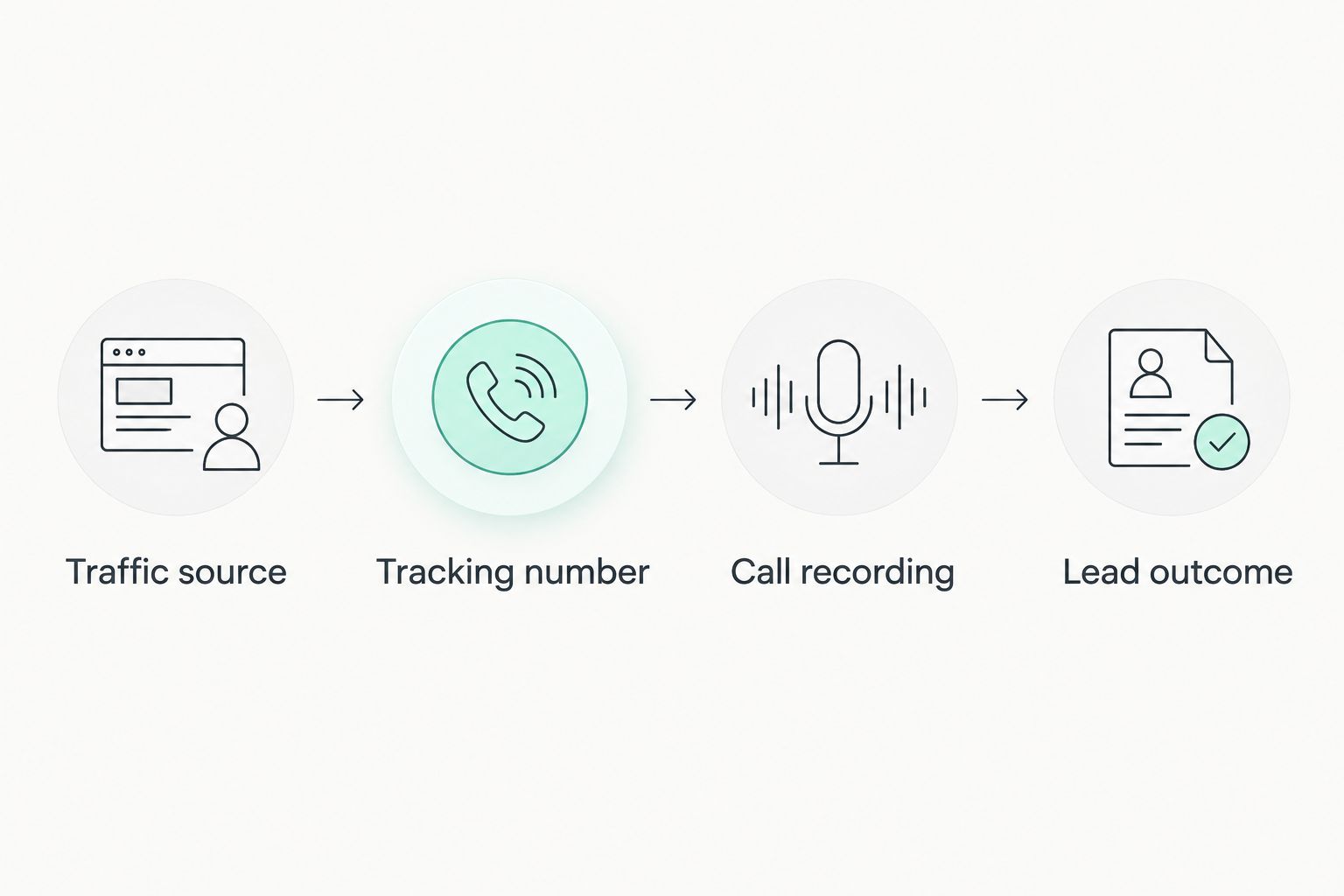
For a practical evaluation in 2026, ask each vendor to show the same path: traffic source, tracking number, call recording, lead outcome. Then ask where the booking result lives. Those are separate records unless your phone and office systems connect them.
Call tracking software at a glance
| Software | Best for | Standout capability | Key limitation |
|---|---|---|---|
| CallRail | Owner-run contractors comparing inbound channels | Call attribution and recording | Does not manage the job after the call |
| Invoca | Multi-location teams | Conversation analysis across a larger operation | More platform than a small team needs |
| Nimbata | Smaller teams starting with attribution | Call tracking without an enterprise workflow | Does not replace a booking system |
| WhatConverts | Teams receiving calls, forms and chats | Reporting on different lead types together | Requires consistent lead qualification to make reports useful |
| CallTrackingMetrics | Teams with involved phone workflows | Call routing alongside attribution | Needs a clearly defined routing setup |
The table is a decision guide, not a claim that every contractor needs every feature. Start with the lead sources and phone workflow you already have. Adding conversation analysis before anyone records booking outcomes will create another dashboard, not a clearer view of revenue.
1. CallRail: best call tracking software for inbound attribution
CallRail connects calls to marketing sources through tracking numbers and dynamic number insertion. It also provides recordings and call data for reviewing what happened after a prospect called. That makes it a sensible starting point for a contractor trying to distinguish website traffic from paid search and other inbound sources.
The strongest use case is a business already getting inquiries from several channels but discussing them as one undifferentiated pile of leads. Give each source an appropriate tracking setup, then compare qualified inquiries rather than total rings. Before replacing a number on a Google Business Profile or another listing, decide how the primary business number will remain accessible and check the platform's setup guidance.
CallRail pros:
- Attributes inbound calls to marketing sources instead of leaving every call in one phone log.
- Keeps recordings available for call-handling reviews.
- Supports connections to other marketing and customer systems.
CallRail cons:
- Attribution alone does not show whether a job was booked.
- Dynamic number insertion needs careful setup; an incorrectly placed number can muddy source data.
Best for: an owner-run roofing, HVAC, plumbing, landscaping or tree service company that needs a clear account of where inbound calls originated. Verdict: Buy if the office will also record call outcomes. Getyouralgo's contractor marketing and lead qualification services address what happens beyond that source report; CallRail is the software pick, not a substitute for that work.
2. Invoca: best call tracking software for multi-location teams
Invoca focuses on call attribution and conversation analysis for organizations handling calls at a larger scale. For a home service company with multiple locations, the attraction is a consistent way to examine inbound conversations across teams rather than relying on separate local phone logs.
That distinction matters when marketing is shared but calls are answered locally. One office can report a call as a lead while another counts only a requested estimate. Define the same qualification rule across locations before using any central report to compare them. Invoca gives a larger operation a platform for that analysis; it does not create a common definition on its own.
Invoca pros:
- Suits a business that needs call reporting across multiple teams or locations.
- Adds conversation analysis to source attribution.
- Gives central marketing staff a way to examine phone interactions across the operation.
Invoca cons:
- A single-location contractor has less reason to take on a larger-scale platform.
- Analysis still depends on a clear definition of a qualified inquiry and a recorded booking outcome.
Best for: a multi-location roofing or HVAC organization coordinating marketing and call reviews across offices. Verdict: Buy when locations need shared reporting; Skip if one owner and one office handle every call.
3. Nimbata: best budget option for a smaller team
Nimbata offers call tracking and attribution for a business that wants to identify where callers came from without starting with a complex, multi-location reporting project. A smaller contractor can use that narrower brief to keep implementation focused: identify the sources, route the calls, and review the inquiries.
The budget verdict is about the scope of the job, not a promise about current pricing. Ask for a current quote based on the numbers and usage you actually need; do not choose a platform on a headline plan alone. If your office also needs dispatch, estimates and customer history, put those requirements in a separate software evaluation.
Nimbata pros:
- Keeps the initial decision focused on tracking inbound calls.
- Fits a team that does not need an enterprise conversation-analysis project.
- Lets the office review attribution before adding a wider reporting process.
Nimbata cons:
- Call tracking does not replace a CRM or job-scheduling system.
- A growing team must check that its required integrations and reporting workflow fit before committing.
Best for: a small home service team whose immediate question is which channel generated each call. Verdict: Buy after confirming the required integrations and current terms; Hold if the real gap is dispatch or customer records rather than attribution.
4. WhatConverts: best for calls, forms and chat together
WhatConverts tracks several types of inbound leads, including calls, form submissions and chats. That makes it the clearest fit here for a contractor whose website inquiries cannot be judged from call data alone. A form requesting a roofing estimate and a call asking for the same service should be visible in the same lead review process.
The benefit depends on qualification. If your team counts every form submission as a viable job but screens phone calls for service area and job type, a combined total still gives the wrong picture. Use the same criteria for each lead type, then compare sources on qualified inquiries and recorded outcomes.
WhatConverts pros:
- Brings phone, form and chat inquiries into a shared reporting view.
- Helps prevent website form leads from disappearing from a phone-first marketing report.
- Supports lead qualification rather than relying only on submission counts.
WhatConverts cons:
- A combined dashboard is only as useful as the team's lead definitions.
- Contractors receiving almost all inquiries by phone may not need its broader lead-type focus.
Best for: a contractor receiving meaningful inquiries through the phone and website. Verdict: Buy if several lead types need one review process. Getyouralgo's contractor marketing services include websites and lead qualification, which makes the distinction between a submitted inquiry and a viable appointment especially relevant.
5. CallTrackingMetrics: best for involved call routing
CallTrackingMetrics combines call attribution with tools for directing and managing inbound conversations. Choose it for a phone operation that needs more than a record of which ad or page drove a call. For example, a contractor may need different call paths for new inquiries and existing customers; the routing design should reflect how the office actually works.
Write that design down before configuring software. Who answers when the main line is busy? What happens when a call is missed? Who marks an inquiry as qualified? If those questions have no owner, a more elaborate phone platform can make a disorganized process harder to see.
CallTrackingMetrics pros:
- Combines source reporting with call-routing capabilities.
- Gives teams handling several inbound paths a way to organize the phone workflow.
- Keeps calls available for review alongside their attribution data.
CallTrackingMetrics cons:
- Routing rules need ongoing ownership as staff and schedules change.
- A simple, single-line operation may not use enough of the workflow features to justify the added setup.
Best for: a contractor whose office needs deliberate routing as well as marketing attribution. Verdict: Buy when the phone workflow is documented; Hold until it is.
How this list was ranked
The ranking puts owner-run contractor needs ahead of feature volume. Source attribution and a usable call record come first; lead qualification, handoff and manageable administration determine whether those records change a decision. CallRail takes the overall spot because its call-focused workflow matches the basic question most contractors bring to this category: where did the inquiry originate?
The other recommendations serve distinct problems. Invoca addresses shared reporting across locations. Nimbata keeps a smaller attribution project focused. WhatConverts includes non-phone inquiries. CallTrackingMetrics gives routing a larger role. No vendor wins every use case, and no call tracking vendor should be judged by call totals alone.
Which call tracking software should you choose?
Choose CallRail by default in 2026 if your immediate problem is identifying which inbound channel generated a call. Choose Invoca if several locations need a common conversation-review process. Start with Nimbata if you need a smaller attribution setup and have confirmed its integrations meet your needs. Pick WhatConverts when forms and chat belong in the same lead report as calls. Pick CallTrackingMetrics when call routing is part of the problem you must solve.
Before committing, trace 1 sample inquiry from source to phone record to office outcome. Then check 2 fields in the system your staff uses every day: lead source and booking outcome. If one is missing, decide who will enter it and where. In 2026, that handoff matters more than adding another call dashboard. A field service management software comparison is the next step if the missing piece is job tracking rather than phone attribution.
Getyouralgo is a contractor marketing agency, not a software vendor in this ranking. Its stated services cover Google Business Profile optimization, local search, websites, outbound appointment-setting and lead qualification. Pairing those activities with a call record gives you a way to ask whether inquiries are reaching the right person and becoming appointments.
Discuss your contractor lead flow
Review GBP visibility, local search and lead qualification with Getyouralgo.
FAQ
What's the best call tracking software for home service businesses in 2026?
CallRail is the best overall choice for an owner-run contractor that needs to connect inbound calls to marketing sources in 2026. Choose a different platform if multi-location reporting, combined form tracking or involved call routing is the main requirement.
Is CallRail better than Invoca for a local contractor?
CallRail is the better starting point for a single-location contractor focused on inbound attribution. Invoca fits an organization that needs conversation analysis across multiple teams or locations.
When should I choose WhatConverts instead of a call-focused platform?
Choose WhatConverts when calls, website forms and chats all produce inquiries your team needs to qualify. A call-only view leaves those other lead types out of the same review.
Does call tracking show which calls became booked jobs?
Call tracking identifies and records inbound calls, but a booked-job report needs the outcome entered or connected from another system. Confirm that handoff before treating call totals as sales results.
Can I track calls from Google Business Profile separately?
Yes, a distinct tracking setup can separate calls from a Google Business Profile from calls attributed to other sources. Check how your chosen platform handles the business's published number before changing the listing.
Is Nimbata a replacement for a contractor CRM?
No, Nimbata is a call tracking option, not a replacement for managing customer records and jobs. Check its integrations if the office needs call information in an existing CRM.
What should a small contractor check before buying call tracking software?
Check source attribution, number setup, call review, integrations and who records the booking outcome. Ask the vendor to demonstrate a call's path from first contact to the system your office uses.
One last thing
In 2026, the call that exposes a marketing problem is not always a missed call. It can be an answered call marked as a lead even though the caller was outside your service area. Keep new qualified inquiries, existing-customer calls and wrong-number or irrelevant calls separate before judging a campaign. Getyouralgo's lead qualification service is relevant to that distinction; the tracking platform supplies the call record, while your team decides what the inquiry meant.